Loading and Advancing
While Initialization outlines how to manually setup a StarCluster and its basic functionality, several functions have been written to load a StarCluster from output generated by commonly used software. More specifically, load functions have been written for AMUSE particle sets and AMUSE output files, Astropy Tables, GALPY, LIMEPY, Nbody6 (with and without stellar evolution) and NEMO/Gyrfalcon. A load function has also been written for a generic snapshot, where column assignments can be set manually. Finally, it is possible for users to use their own load function. Please feel free to suggest or write load functions for your personalized code in order to more easily use clustertools. The benefit of using a load function is that, when dealing with a full simulation that provides cluster snapshots at difference times, it is possible to move to the next time step using StarCluster.advance. Note this can work when manually setting up a StarCluster if the appropriate ctype is given along with necessary information for the filenames associated with each snapshot.
Load
The load_cluster function can be called via:
>>> cluster=load_cluster(ctype="snapshot",units="pckms",origin="cluster",ofile=None,orbit=None,filename='00000.dat',**kwargs)
Where I have an ascii file named 00000.dat with columns of mass (Msun), position (x,y,z in pc) and velocity (vx,vy,vz in km/s) in clustercentric coordinates. In this example, no orbital information is provided for the cluster. If a file has been opened that contains orbital information, it can be passed via ofile and the next line is read as time , position (xgc,ygc,zgc), and velocity (vxgc,vygc,vzgc) in galactocentric units. If the units are not the same as cluster.units, then ounits can also be given. Alternatively one can pass a galpy orbit via orbit. See DOCUMENTATION for a list of the keywords that can also be passed via load_cluster, including those related to setting up customized snapshot directories, files, and filenames. If neither ofile or orbit have been set and cluser.origin='galaxy', the find_centre operation will be called (See Operations) and the cluster’s centre will be used to define its orbital coordinates. If cluser.origin='cluster', then find_centre will just set the cluster’s centre.
As mentioned above, ctype can also be set to 'amuse',``’astropy_table’,’nbody6’, ``'nbody6pp',``’galpy’,’gyrfalcon’`` or 'nemo', 'limepy' , 'snapshot'. For ctype!='snapshot', several important things happen behind the scenes.
When
ctype='amuse', either afilenamemust be given that can be read with Amuse’s read_set_from_file orparticlesmust be given which contains an AMUSE particle set.When
ctype='astropy_table', ‘’particles’’ must be given which contains a ~astropy.table.Table instance of stars. If necessary, acolumn_mappercan be passed.When
ctype='galpy', anOrbitsobject must be passed viaparticles.When
ctype='gyrfalcon'orctype='nemo', the key word argumentfilenamemust also be given soclustertoolsknows what file to open and begin reading.When
ctype='limepy', you can pass a Lowered Isothermal Model that has been initialized using LIMEPY (Gieles & Zochhi 2015) viamodeland theStarClusteris generated usinglimepy’ssampleroutine. The default units and origin here are againNone, so should be set accordingly.An additional feature that has been implented when using
load_clusterwithctype='limepy'is the ability to setup a single-massStarClusterthat is representative of a Galactic globular cluster with the parameter'gcname'. For example to initialize a cluster that is similar to Pal 5, one would callcluster=setup_cluster('limepy',gcname='Pal5'). If the named cluster has had its density profile fit by de Boer et al 2019 with a LIMEPY model, then those parameters will be used to initialize the cluster. It is important to note that de Boer et al. 2019 find that their SPES models fit observed clusters better than LIMEPY models, however a sampler for SPES models has not been implemented. If the cluster was not studied by de Boer et al. 2019, King model parameters from Harris et al 1996 (2010 update) will be used. Note thatsourcecan be set manually toHarrisif Harris et al 1996 (2010 update) is preferred over de Boer et al. 2019. The cluster is also assigned orbital parameters using theOrbit.from_name()feature ingalpy, which first searches Vasiliev 2019 for globular cluster orbital parameters before looking to SIMBAD.
When
ctype='nbody6', OUT33, OUT9 are read intoclustertools, thecluster.unitsis set tonbodyandcluster.originis set to'cluster'. If your simulations includes stellar evolution, fort.82 and fort.83 will also be read. All additional information provided, on top of stellar masses, positions, velocities, and ids are saved as individual variables that can be called. Hence it is possible to convert between units and coordinate systems.When
ctype='nbody6pp'orctype='nbody6++', CONF.3_0 is read intoclustertools, thecluster.unitsis set tonbodyandcluster.originis set to'cluster'. If your simulations includes stellar evolution, bev.82_0 and sev.83_0 will also be read. All additional information provided, on top of stellar masses, positions, velocities, and ids are saved as individual variables that can be called. Hence it is possible to convert between units and coordinate systems.
Finally, it should be noted that load_cluster has an input load_function. This feature allows for a custom load function to be passed to load_cluster.
Functions
|
Load a StarCluster snapshot from a generic code output |
Advance
In cases where a series of snapshot files represent the time evolution of a given cluster, or a single file contains all the entire evolution of a star cluster (as is the case for NBODY6 and GYRFALCON), an advance function has been created to very simply move to the next time step. It can be called via:
>> cluster=advance_cluster(cluster, ofile=None, orbit=None, filename=None, **kwargs):
Similar to load_cluster, a file containing orbital information or a galpy orbit can be provided. filename only needs to provided if the filename of the next snapshot is not simply an incremental increase of an integer in the original file name. For example, given the working example where the initial snapshot was read from '00000.dat', advance will automatically look for '00001.dat'. In cases where the increment between snapshots is not 1, which is the case for NBODY6++, simply set dtout to equal the step size when intializing the cluster and/or when calling advance_cluster. advance_cluster will return an empty StarCluster with cluster.ntot=0 when no more snapshots can be found. See the documentation or example notebooks for how more complex filenames can still be used by clustertools.
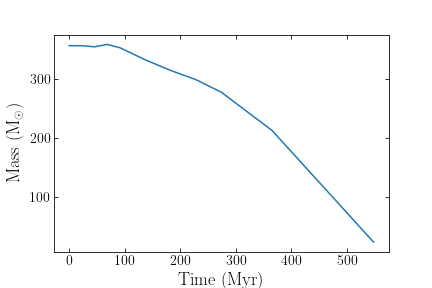
The usefullness of advance_cluster function is perhaps best illustrated in the event that a user wishes to quickly determine the mass evolution of a simulated star cluster. Using clustertools and only a few lines of code, this can easily be achieved:
>>> import clustertools
>>> t=[]
>>> m=[]
>>> cluster=load_cluster(ctype="nbody6")
>>> while cluster.ntot>0:
>>>     t.append(cluster.tphys)
>>>     m.append(cluster.mtot)
>>>     cluster=advance_cluster(cluster)
Plotting mass as a function of time would then return:
Functions
|
Advance a loaded StarCluster snapshot to the next timestep |